


AlertCops strengthens protection for vulnerable groups with improvements to the SOS Button
The AlertCops app maintains and improves the functionality of the SOS Button, a key tool for citizen protection.
The SOS Button tool includes specific reinforcements for three vulnerable groups:
- Victims of gender-based violence
- Healthcare personnel
- Child protection personnel
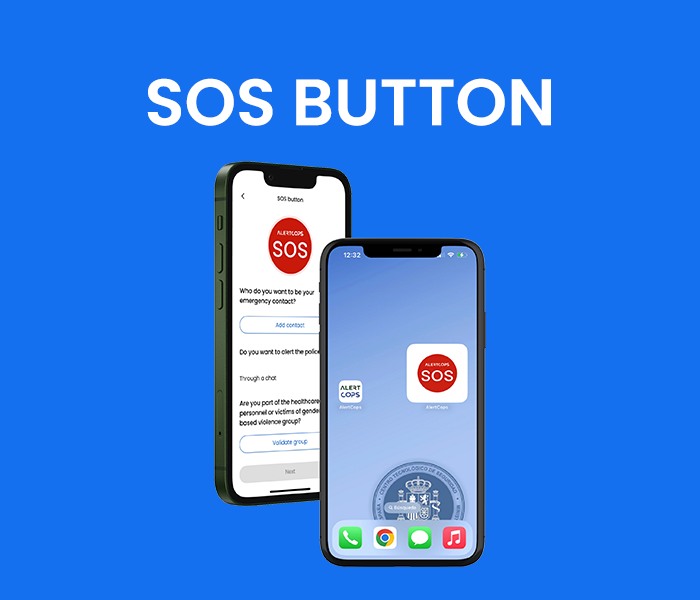
What is the SOS Button?
The SOS Button allows you to send an urgent alert to the nearest police station, including your location and a 10-second audio recording of the surroundings. This feature is designed to respond quickly in high-risk situations: simply press the button 5 times in less than 6 seconds from the device’s main screen.
How to install the SOS Button on your home screen?
1. Install the AlertCops app and enter your details.
2. If you belong to any of the mentioned groups, identify yourself accordingly:
- Victims of gender-based violence: Code AVDG + ID/Foreigner ID (DNI/NIE)
- Healthcare personnel: Code APSA + ID/Foreigner ID (DNI/NIE)
- Child protection personnel: Code ASSA + ID/Foreigner ID (DNI/NIE)
3. To add the button to your main screen:
- Press and hold an empty space on the screen.
- Tap Widgets and look for “SOS Button.”
- Press and hold the widget, then drag it to the desired location.
With this improvement, AlertCops continues its commitment to public safety, offering a direct, discreet and effective way to call for help in critical situations. If you are part of any of these groups, we encourage you to activate this feature and keep it accessible on your device.
How to comunicate an alert?
Communicating a SOS alert is very simple. Simply press this button five times in less than six seconds to send an emergency signal to the State Security Forces and Corps along with the position of the person affected. In addition, the alert will also send a 10-second audio recording that will allow for more information on what is happening to the citizen, thus offering a more effective, quick and accurate response.
More news
The Ministry of the Interior launches the new version of AlertCops: easier, safer, closer

Safe fun!

AlertCops at the 1st Police Training Day on procedures for searching for missing persons